
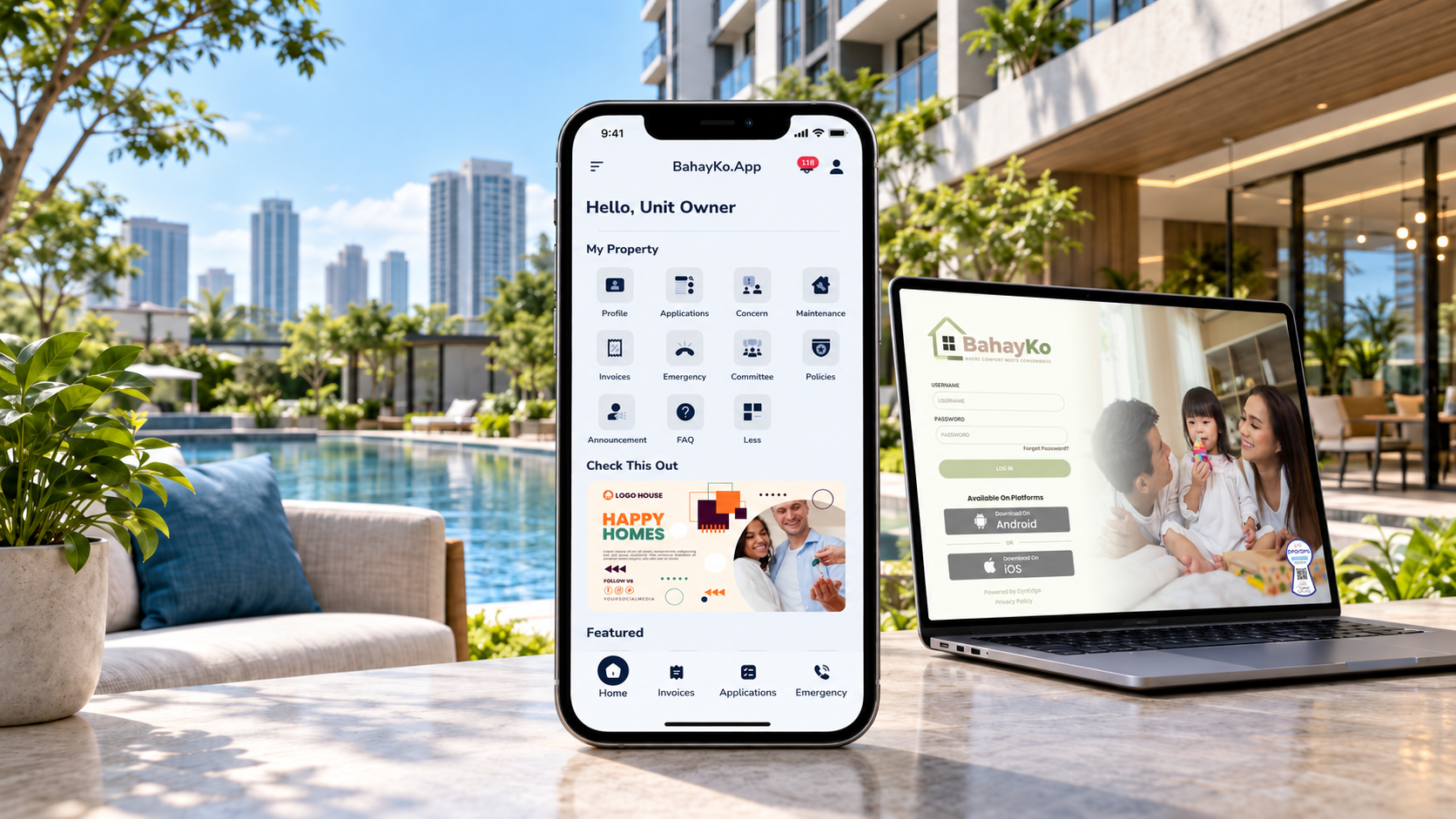
A resident app for property management gives residents one digital place to access common property services and information. Depending on the property and approved setup, the app supports selected payments, requests, announcements, documents, community services, visitor-related activities, and other resident-facing tasks. The main purpose is simple. Residents should know where to go to find information, submit a request, review a record, or follow an update.
A resident app works best as part of a wider property management system. Residents see the services and information they need for daily use, while administrators and authorized staff manage the records, permissions, reviews, and operational work behind those services. This separation helps property teams give residents useful access without exposing the full administrative system. For the broader software selection process, see our guide to choosing property management software in the Philippines
What Does a Resident App Do in Property Management?
A resident app brings selected property services into a mobile-friendly experience. Instead of relying on separate chat threads, paper forms, email messages, and office visits, residents receive one defined channel for supported tasks.
Common resident-facing areas include payments, service requests, notices, documents, visitor-related requests, permits, facility-related services, and account information. The exact set depends on the property, system configuration, user permissions, and operating process.
The app should not replace every property process. Some requests still require staff review, supporting documents, accounting checks, security verification, maintenance work, or management approval. A useful app gives residents a clear starting point and a consistent place to review relevant information.
For a broader system-level review, see the guide to property management software features. That article covers the larger set of records, user roles, billing, maintenance, access, reporting, and mobile requirements that property teams should evaluate.
Which Resident Services Belong in the App?
A resident app should reflect the services residents regularly need from their property management office. These may include billing information, service requests, community announcements, documents, visitor coordination, and shared facility reservations.
When evaluating these functions, property teams should consider how residents access information, what actions they can complete, and which requests still require staff review. The goal is to make common property interactions easier to manage without replacing established responsibilities.
Payments and Account Information
Residents need a convenient way to check applicable charges, invoices, and payment-related information associated with their property accounts. Having these records available through a mobile app can reduce the need to contact the administration office for routine billing inquiries.
Property managers should evaluate which billing details residents can view, how payment information is presented, and whether the available services match the property's actual collection procedures.
Financial verification, adjustments, accounting decisions, and any payment reconciliation remain subject to the property's established controls.
Requests, Concerns, and Maintenance
A resident app should provide an organized channel for reporting property concerns and submitting applicable service requests. These interactions may involve administrative inquiries, requests for property-related work, or maintenance needs requiring attention.
The distinction matters because a general concern, a job request, and a maintenance service may require different information and responsible personnel.
Property teams should evaluate how residents describe their requests, access relevant details, and receive available updates. Staff must still determine the appropriate action, review requirements, and response procedures.
For more information about evaluating request records and service responsibilities, read our guide to property request management software.
Announcements and Community Information
Residents rely on property management for updates about community activities, facility schedules, building services, and other announcements.
A resident-facing communication channel can make published notices easier to find and review. Property teams should consider whether residents can access relevant announcement details and identify information that requires their attention.
Urgent incidents, legal notices, and safety-related communication must still follow the property's established communication procedures. Digital announcements should complement those responsibilities.
Documents and Policies
Property administration often requires residents to access or provide documents. Depending on the property, these may include applicable forms, supporting records, community policies, and information associated with their unit or account.
Resident-facing document functions should be evaluated for ease of access, appropriate permissions, and the protection of personal information. Property teams also need to decide which documents residents may upload or view and which records should remain restricted.
For a closer look at organizing records and managing appropriate access, see our guide to property document management software.
Visitor and Access-Related Services
Visitor coordination is another important resident interaction, particularly in condominiums and residential communities with established security procedures.
Depending on the available software and property configuration, resident-facing services may support guest invitations, visitor information, QR codes, and coordination involving unexpected arrivals.
Other property applications may include work permits, gate passes, and move-in or move-out requests. These activities should remain subject to the property's applicable requirements.
A digital request, QR code, or submitted application should not be treated as automatic authorization to enter the property or proceed with an activity.
Amenity Reservations and Shared Facilities
Residents may need to reserve shared spaces such as function rooms, meeting areas, or recreational facilities.
A mobile reservation function can provide a more organized way to request access to available amenities and refer to reservation information. This is particularly relevant when several residents want to use the same facility.
Property managers should evaluate how reservation requests fit facility schedules, eligibility rules, usage conditions, and any required approvals.
The mobile experience should help residents understand the available process while property personnel retain responsibility for managing facility access and applicable community rules.
How Is a Resident App Different From the Admin System?
A resident app focuses on the resident experience. The administrative side focuses on property operations.
Residents usually need a smaller set of actions. They need to view relevant information, submit supported requests, provide required details, review status, and access community services. Administrators and staff need broader controls for records, user access, billing, maintenance, security, approvals, reporting, and operational review.
This difference matters during software evaluation. A polished mobile interface doesn't prove the administrative side fits the property's processes. Similarly, a strong admin dashboard does not guarantee residents will find the mobile experience clear.
Property teams should test both sides. Ask a resident to complete a typical task. Then ask the responsible staff member to review the same activity from the administrative side. Check whether both roles see the right information and whether the handoff matches the property's real process.
What Should Property Teams Evaluate in a Resident App?
Start with actual resident tasks instead of a long feature list. A useful property management mobile app should fit the services the property already provides and the records staff already maintain.
Review these areas during evaluation:
Resident access: Check how residents access the app and what information becomes visible after they log in.
Service relevance: Confirm that the app covers the tasks residents use most often.
Clarity: Make sure labels, forms, status information, and next steps are easy to understand.
Permissions: Check whether resident access stays separate from staff or administrative access.
Records: Confirm where requests, documents, account information, and activity records appear after submission.
Mobile fit: Test the experience on devices residents are likely to use.
Support process: Identify who handles questions when a resident cannot complete a task or sees incorrect information.
Teams comparing a tenant mobile app should also test common exceptions. What happens when a request lacks details? What happens when the wrong unit appears? What happens when a resident changes contact information? These checks reveal whether the resident experience supports normal operations instead of adding another disconnected channel.
How Should Privacy and Access Be Handled?
Resident-facing systems process names, contact details, property information, documents, account records, access-related information, and service requests. Property organizations should define why they collect information, who needs access, how records stay accurate, and how long information should remain available.
The National Privacy Commission's Implementing Rules and Regulations for the Data Privacy Act require processing to be transparent, for a legitimate purpose, and proportionate. Organizations are required to implement suitable and effective organizational, physical, and technical security measures to adequately protect personal data in accordance with compliance regulations.
A resident app does not establish privacy compliance by itself. Property policies, user permissions, staff responsibilities, contracts, retention practices, security controls, and incident procedures also matter. Property teams should review their own obligations and seek qualified guidance when needed.
What Does BahayKo Resident App Support?
BahayKo Resident App brings several property services into a mobile experience for residents. Through its supported functions, residents can view applicable invoices, submit concerns and job requests, access maintenance services, and review relevant request details and notifications. These functions help residents interact with property management using an organized digital channel.
For community communication, the app provides access to announcements and applicable property policies. Residents can also upload and view permitted documents associated with their accounts. Property personnel remain responsible for managing the information, reviewing submissions, and maintaining appropriate access permissions.
BahayKo also supports invited visitor management, including QR codes for applicable invitations, as well as resident involvement in walk-in visitor coordination. Residents can request amenity reservations and use available application functions for work permits, gate passes, and move-in or move-out activities. These functions operate according to the property's established approval and security procedures.
The exact resident-facing experience depends on the services enabled for each property and the permissions assigned to users. Explore BahayKo's Resident App and property management features for more information about its available services.
When Does a Resident App Add the Most Value?
A resident app adds the most value when residents repeatedly need access to the same property services and information. The benefit comes from giving those interactions a clear digital home.
For example, a property that receives frequent requests, payment questions, visitor inquiries, document requests, and announcement questions often benefits from bringing those resident interactions into one defined access point. The property team still needs clear procedures behind the app. The mobile experience works best when staff know who reviews each request type, where records belong, and how updates reach the right user.
A resident portal Philippines search often shows both browser-based portals and mobile apps. Property teams should focus less on the label and more on the resident journey. Check what residents need to do, what information they should see, and how the system connects those activities with property operations.
The same principle applies when comparing a community management app Philippines search result. The product category name matters less than the supported roles, services, records, and controls.
How Should You Prepare for a Resident App Demo?
Prepare a short list of real resident scenarios before the demonstration. Use examples from your current property operations.
A resident checks an account-related record.
A resident submits a concern or service request.
A resident reviews an announcement.
A resident looks for a document or policy.
A resident starts an access-related request for the property.
A staff member reviews the resident activity from the appropriate administrative side.
During the demo, check whether the resident understands what to do without extra explanation. Then review the same activity from the staff side. This approach keeps the evaluation tied to real work, not screenshots or feature names.
Frequently Asked Questions
What is a resident app used for?
A resident app gives residents digital access to supported property services and information. Common areas include payments, requests, announcements, documents, community services, and selected access-related activities.
Is a resident app the same as property management software?
No. The resident app is the resident-facing part of a wider system. Property management software also includes administrative records, billing, maintenance, security, reporting, user management, and other operational functions.
Is a resident app different from a resident portal?
The terms often overlap. A resident portal often runs mainly through a web browser, while a resident app usually refers to a mobile application. Property teams should compare supported services, access, records, and user experience instead of relying on the label alone.
Should every property use the same resident app features?
No. The right resident-facing functions depend on the property type, resident needs, operating procedures, permissions, and implementation scope. Teams should prioritize services tied to actual resident activity.
Does a resident app replace property staff?
No. A resident app gives residents a clearer way to access supported services. Staff still handle review, accounting work, maintenance, security, approvals, exceptions, records, and other responsibilities assigned by the property.
Is the BahayKo App available on iOS and Android?
Yes. BahayKo's current download page provides official iOS and Android links. Property teams and residents can find the official store links on the Download the BahayKo App page.
What Should You Remember When Evaluating a Resident App?
A resident app for property management should give residents a clear place to access the services and information that apply to them. The strongest evaluation starts with real resident tasks, then checks access, clarity, records, permissions, privacy responsibilities, and the staff process behind each service.
For BahayKo, the Resident App sits within a wider property management platform. Property teams should review the resident experience together with the administrative processes that support payments, requests, announcements, documents, community services, maintenance, access, and other property activities.
Disclaimer
This article provides general property-management and software-evaluation information. This article does not provide legal, privacy, accounting, tax, security, or professional advice. Review your property rules, contracts, procedures, current regulations, and specific operating requirements with qualified professionals where appropriate.